PornWorks Magic Brush Guide: NSFW Inpainting Tips for Beginners

I know, I knowww, You generate a proper stunner of an AI image, but something is just… off.
Maybe she has got six fingers, the lingerie isn't quite sheer enough, or frankly, you just want to see what is hiding underneath that skirt.
The PornWorks Magic Brush sorts that out quickly. It is an inpainting tool built for adults, letting you select any part of an image and rewrite it with a simple text prompt.
Need those pants gone? Done.
Want that mutant thumb fixed? Sorted.
It is basically a digital airbrush with no restrictions, and once you learn how to use it, you will never settle for a flawed generation again.
🤷♀️ What is the Magic Brush (Inpainting)?

In simple terms, Inpainting is a feature that lets you edit specific parts of an image while leaving the rest untouched.
On PornWorks, they call it the Magic Brush or AI Porn Brush.
Think of it like a digital scalpel. You highlight an area, say, a bra strap or a wonky hand, and type a new prompt like “remove strap” or “perfect manicure.”
The AI analyses the surrounding texture, lighting, and skin tone to fill in the blank seamlessly.
It is the secret weapon for turning “meh” generations into masterpiece-level adult content.
🪜 Step-by-Step: How to Use the Magic Brush ?
Ready to play doctor with your images? Here is the drill to get you editing like a pro.
Head to the Editor
First, go to the PornWorks generator.
You can either generate a new image from scratch or upload an existing one that needs a “touch-up”.
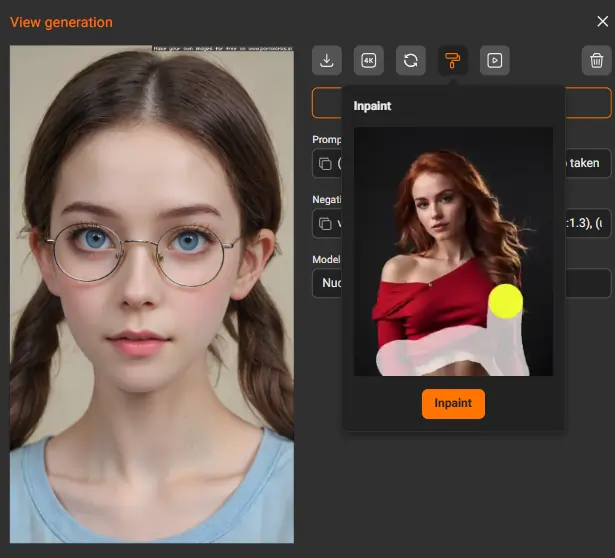
Once your image is ready, look for the Edit or Inpaint icon (usually looks like a little brush or pencil).
Paint Your Target
Select the Brush Tool. Now, colour over the area you want to change.
Tip:
Don't be stingy. If you are changing a bikini top to a topless look, paint slightly outside the lines of the clothing so the AI has room to blend the skin edges perfectly.
The Magic Prompt
This is where the magic happens. In the prompt box, tell the AI what you want in that specific spot.
Want nudity? Type:
"nude, nipples, natural breasts".Want a tattoo? Type:
"intricate dragon tattoo, black ink".Fixing a face? Type:
"detailed eyes, cute smile, high res".Adjust Settings & Generate
Hit that generate button and watch the AI weave its magic.
It usually takes a few seconds to stitch the new pixels into your original photo.
😇 The “Secret Sauce” Settings
Most blokes ignore the sliders, but if you want top-tier results, you need to tweak these bad boys. Here is your cheat sheet:
😍 Top 3 Uses for the PornWorks Brush
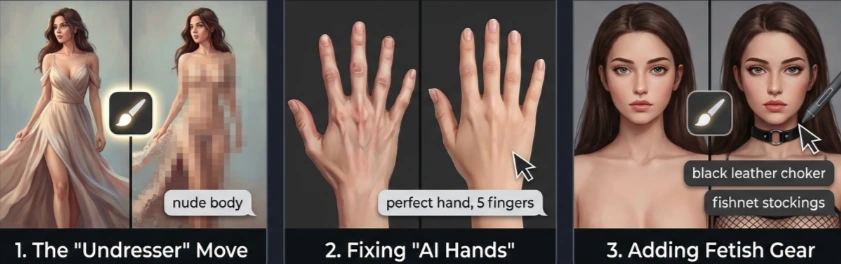
The “Undresser” Move
Let's not beat around the bush. This is why you are here. The Magic Brush is elite at removing clothing.
Paint over a dress, prompt for “nude body,” and the AI preserves the pose and lighting while removing the fabric.
It is cleaner than those dodgy “deepnude” apps because you control the result.
Fixing “AI Hands”
We all know AI hates hands.
If your dream girl looks like she is throwing up gang signs with 8 fingers, just mask the hand and prompt “perfect hand, 5 fingers.”
It might take a couple of tries, but it saves the image.
Adding Fetish Gear
Got a vanilla pic but want something kinky?
Paint over her neck and prompt “black leather choker.” Paint over the legs and ask for “fishnet stockings.”
You can customise a standard model into your specific fetish without regenerating the whole scene.

AIPornGuru Recommends
🎯 Final Thoughts
The PornWorks Magic Brush isn't just a gimmick; it is an essential tool for any serious collector. It turns you from a passive viewer into an active creator.
You are no longer stuck with what the AI gives; you can grab that brush and sculpt the exact fantasy you have in your head.
So go on, give it a whirl. Take that almost-perfect picture and make it a 10/10. Just remember: with great power comes great responsibility (and a very full hard drive).
Mike Smith, a tech journalist, uncovers the freshest trends in AI porn. With sharp insight, he chronicles how innovations shape adult content’s future, delivering must-read stories for fans of NSFW tech and its evolving role in our world.
Affiliate Disclosure: This post may contain some affiliate links, which means we may receive a commission if you purchase something that we recommend at no additional cost for you (none whatsoever!)