Nectar AI Video 2026: I Made My Companion Move on Screen
Let’s start with the honest version of this story.
When most people sign up for Nectar AI, they come for the chat. Some come for the image generation. A few come because they heard it was one of the better NSFW AI companion platforms on the market right now.
Almost nobody shows up expecting the video feature to be the thing that keeps them.
But here’s what happens. You’re deep in a session, good roleplay, your companion is sharp and in character, and you notice the Companion Video option sitting there in the interface. You click it, half expecting some clunky animated loop with dead eyes and a mouth that doesn’t quite sync.
Instead, you get something that stops you mid-scroll.
Movement. Expression. Pacing. A short, personalized clip that doesn’t look like a PowerPoint slide or a robotic avatar blinking at a camera. It looks like your companion, the one you built, the one you designed, is actually performing.
That’s the moment most users understand what Nectar’s video feature actually is.
This article breaks down every dimension of it. How it works, what it costs, what it genuinely does well, where it still has growing to do, and whether the Ultimate plan is worth paying for specifically for this capability.
🎬 Quick Context:
The Nectar AI companion video feature is a credit-powered generation tool available exclusively on the Ultimate plan. It lives inside a dedicated Image Generator + Video section and operates as a separate mode from in-chat image generation. Each video costs 50 advanced credits and is built around a fully customizable companion model.
🎥 Two Video Environments, One Platform
Before getting into quality and customization, it’s important to understand that Nectar AI’s video capability isn’t a single button. It operates across two distinct environments, and understanding the difference matters for how you use it.
Environment One, The Standalone Video Generator
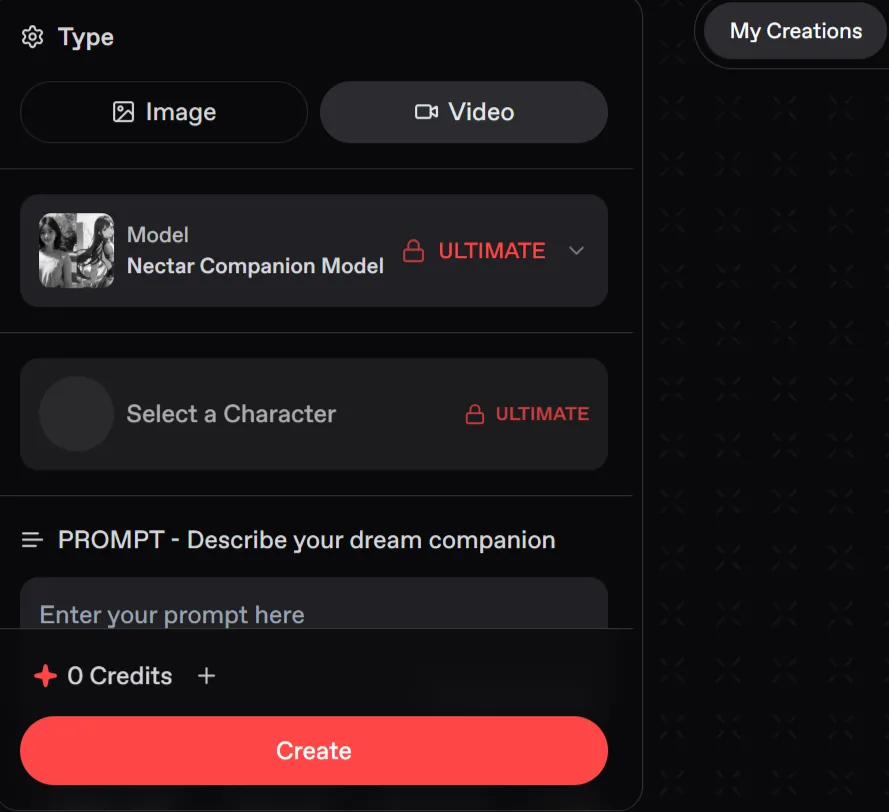
This is the main event. Accessed via the Image Generator + Vid! section in the left menu, this is where you have full creative control. You’re working with the Nectar Companion Model set to Ultimate mode, building video output from the ground up with:
Environment Two — In-Chat Video Generation
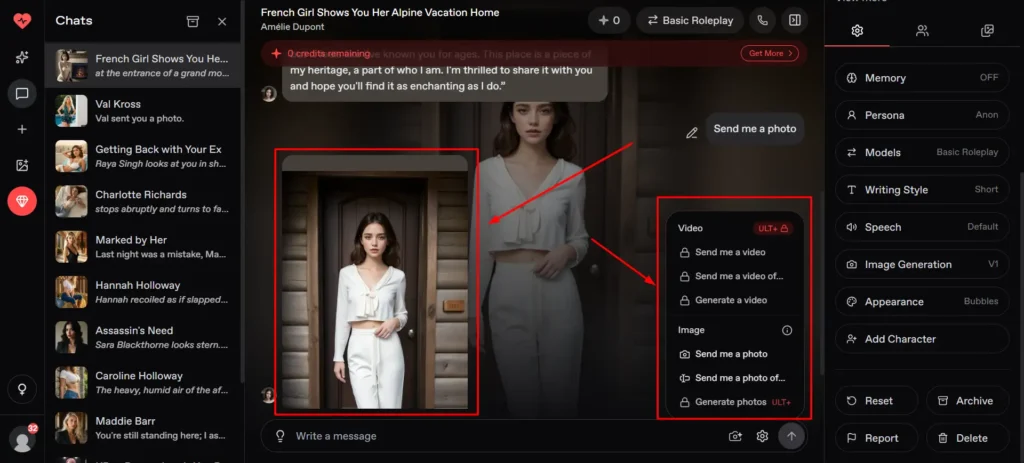
This is the more immersive option. Rather than leaving the conversation to generate a video, in-chat generation lets you request a clip that ties directly to the current roleplay context.
It’s available mid-session, pulling from your companion’s established visual identity and the emotional tone of the conversation you’ve been building.
The key distinction: the standalone generator gives you maximum creative control. The in-chat version gives you maximum immersion. Knowing which environment to use depends entirely on what you’re trying to achieve.
👉 How the Standalone Video Generator Actually Works?
The workflow is more guided than most users expect from an AI tool at this price point. Here’s the full step-by-step process:
Open the Generator
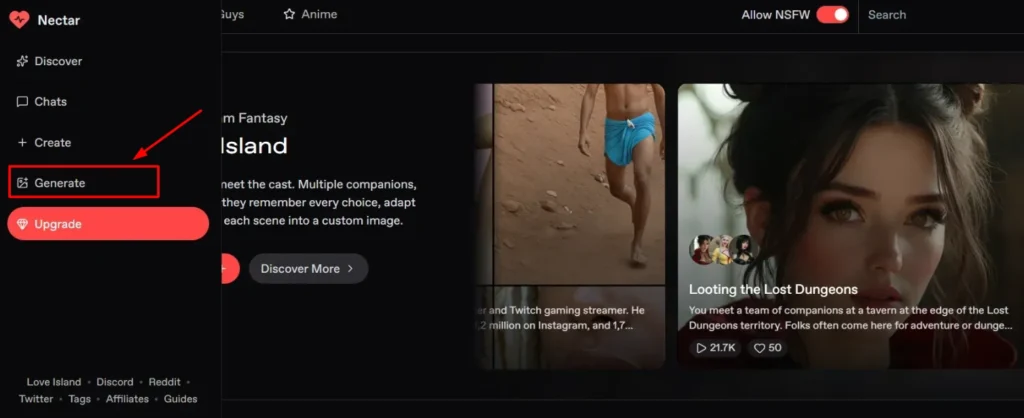
Click Image Generator + Vid! from the left sidebar. This is where both image and video generation live.
Switch to Video Mode
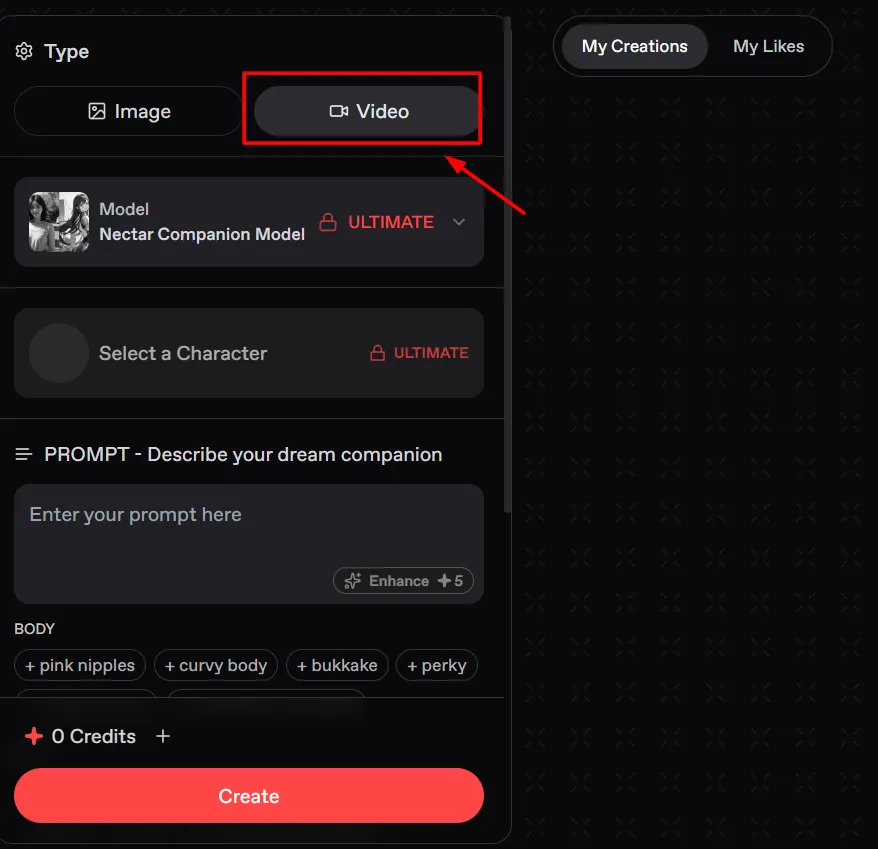
Click the Video tab at the top of the screen. The interface reconfigures to video generation settings.
The Model Is Already Set
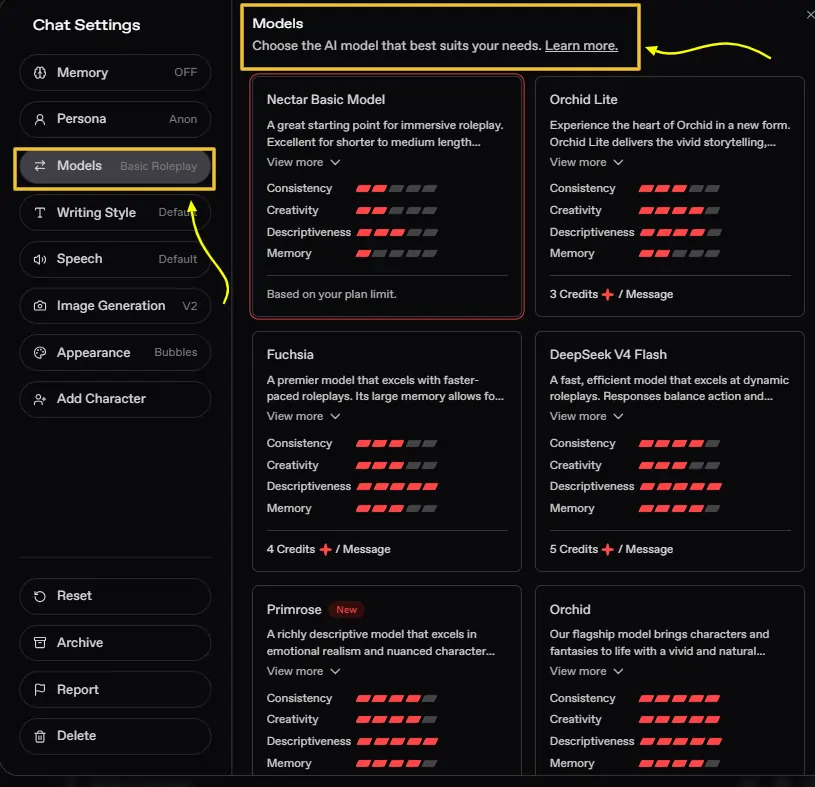
The Nectar Companion Model on Ultimate is pre-selected. You don’t need to change anything to start.
Write Your Prompt or Use Tags
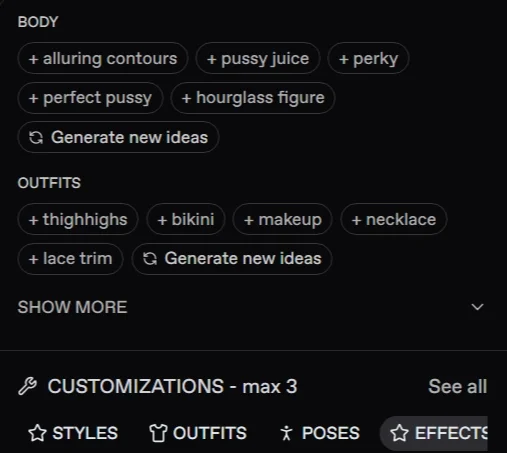
You can describe your companion in natural language, or use the tag system. Tags are injected directly into the prompt for you.
Unlock Face and Scene Tags
Click Show More to access the Face and Scene tag layers. These let you adjust faciand set environmental context — the setting, lighting mood, and background atmosphere of the video.
Control Variation with the Randomize Toggle
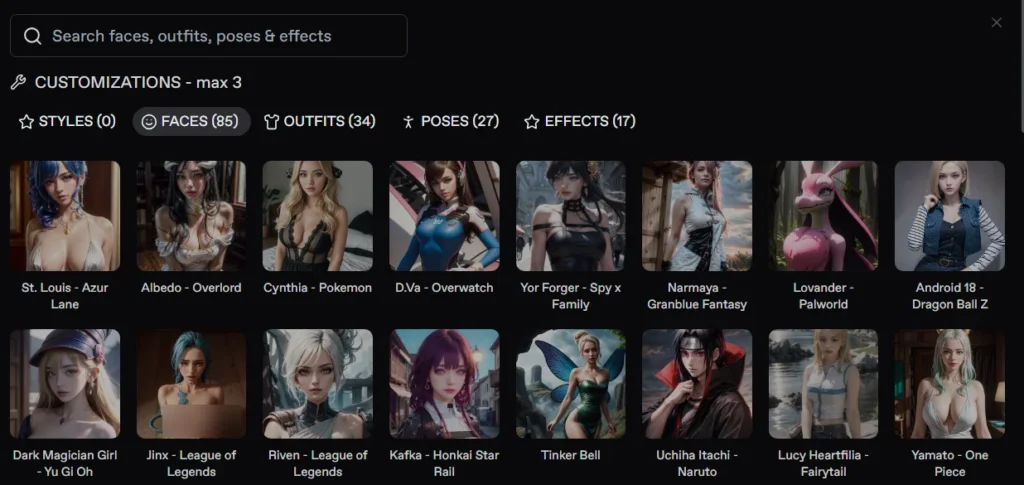
Apply Styles, Poses, and Effects
The Customizations section gives you four active control layers:
Generate, React, Share
Hit Create. When the video renders, you can like it, submit it to be featured on the platform, or hit Share to copy a direct link automatically.
⚡ The Credit Reality
Each video costs 50 advanced credits. This is meaningfully higher than a standard image generation. Before starting a video-heavy session, know your credit balance. Running 10 videos in one sitting will cost 500 advanced credits — factor that against your purchase tier before you start.
🤔 What “Facial Animation” Actually Means on Nectar AI?
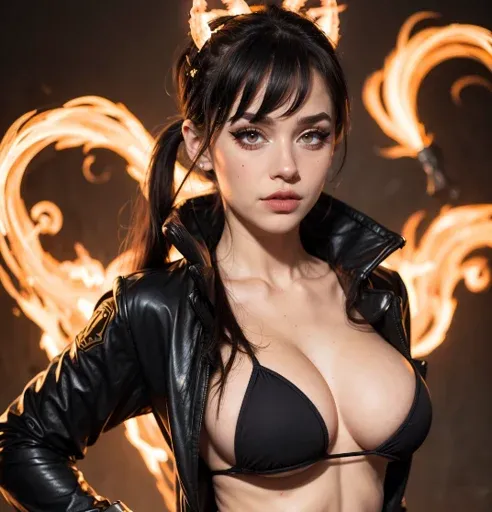
The phrase “facial animation” gets thrown around loosely in the AI companion space. On most platforms, it means a static avatar with a looping blink animation and a mouth that moves approximately in time with generated audio. The result looks like a puppet, not a person.
Nectar’s approach is different, and the difference is in what it doesn’t look like.
Rather than animating a pre-built 3D avatar rig, Nectar’s companion video system generates movement that feels character-specific. The visual output responds to the emotional tone and content of your prompt, not just a generic “talking head” template.
What this means in practice:
That gap between describing and showing is exactly what this feature is built to bridge.
💡 Why This Matters Technically
Most AI facial animation systems work by animating a fixed 3D model. Nectar’s video output is generated rather than animated, meaning each clip is created fresh from the prompt rather than driven by a rigged avatar skeleton. The result has more visual variety but also more variability in consistency, which is worth knowing before you set expectations.
Emotional Responses in Video: What the System Can and Cannot Do
This is where the honest evaluation gets important.
Nectar’s companion video feature is genuinely capable of conveying emotional tone through visual output. The system picks up on the emotional register of your prompt and produces clips that feel tonally appropriate.
An intimate, soft scenario produces different movement and expression than a playful, teasing one. A deep emotional scene reads differently than a high-energy fantasy sequence.
What works well:
Where the system shows its current limitations:
A balanced take from Kalon.ai’s competitive analysis captures this well: “Great for quick concept clips or animations, though don’t expect Hollywood-level output.”
That’s the right frame. Nectar’s companion video isn’t claiming to be Sora or a cinematic production tool. It’s claiming to be a meaningful step up from plain text roleplay, and on that claim, it delivers.
😍 The Nectar Companion Model: What Makes It Different From Standard Generation
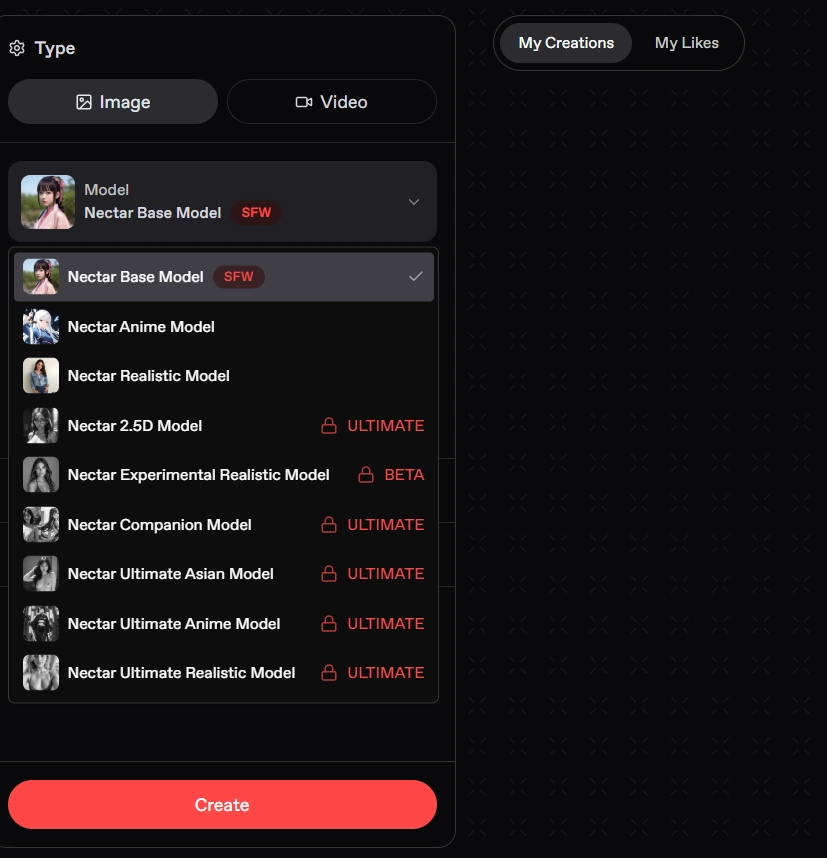
The Nectar Companion Model running on Ultimate is not the same generation architecture as the base image model. It’s specifically trained and tuned for companion-context video output, which has meaningful implications for what it does well.
The companion model understands relational context. When you’re generating a video inside an ongoing chat session, it doesn’t just render a character in a pose, it responds to the emotional context of the conversation you’ve been having. This is what creates the sense of the companion performing for you specifically rather than performing a generic scenario.
The customization layers that shape this model’s output are tiered:
| Layer | What It Controls | Access |
|---|---|---|
| Prompt text | Scenario, mood, narrative direction | All users |
| Outfit tags | Clothing, accessories, styling details | All users |
| Body tags | Physical parameters, positioning | All users |
| Face tags | Facial feature adjustments | Show More |
| Scene tags | Background, environment, lighting mood | Show More |
| Styles selector | Overall aesthetic direction | Customizations panel |
| Poses selector | Physical stance and body language | Customizations panel |
| Effects selector | Visual layer treatments | Customizations panel |
| Randomize toggle | Variation vs. consistency control | Generation panel |
The depth of this control system is genuinely above what most competing AI girlfriend animated platforms offer at this price tier.
You’re not just picking a pose from a dropdown; you’re layering multiple parameters that compound into a specific visual result.
❤️🔥 NSFW Video Generation, What’s Available and What to Expect
The companion video feature, like the broader Nectar AI ecosystem, operates with a manual NSFW toggle that must be enabled before adult content unlocks.
With NSFW mode active, the video generation system, including the outfit tags showing options like nude and explicit body parameters in the Body tag set, produces adult-oriented companion clips rather than filtered output.
What this means practically:
The same companion identity you have defined carries into NSFW video output. Face, body type, and core physical parameters remain consistent between SFW and NSFW generations. You’re generating adult content tied to the specific character you’ve built, not a generic anonymous figure that happens to be explicit.
The honest limitation:
NSFW video generation quality is more variable than NSFW still image generation. The image engine has had longer development time and produces more reliable explicit output.
The video engine is newer, and complex NSFW scenarios benefit from simpler compositions, close-up framing, controlled indoor settings, scenes without elaborate physical choreography, to get the most consistent results.
What users consistently report:
🎥 In-Chat Video Generation: The Immersion Layer
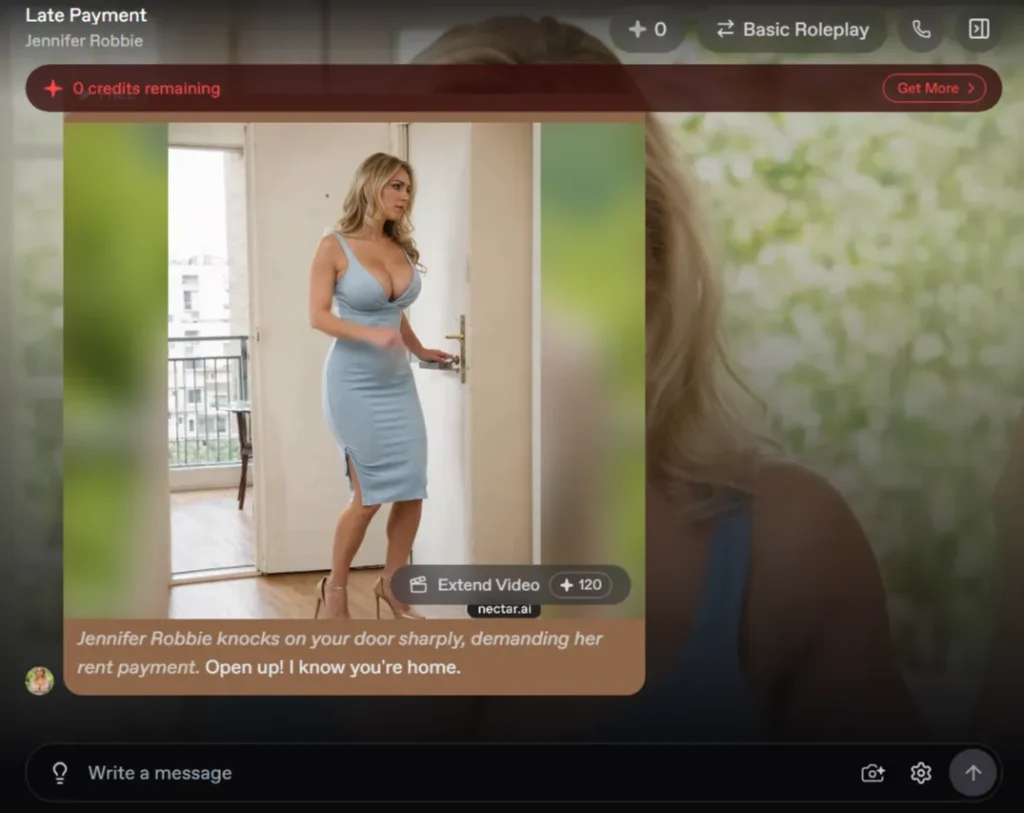
The in-chat video generation capability is the feature that closes the gap between “using an AI tool” and “being in a scene.”
Rather than leaving the chat interface to navigate to a separate generator, in-chat video generation lets you request a clip at any point during a conversation.
The companion’s established visual identity, the emotional tone of the current exchange, and the roleplay context you’ve been building all feed into the output.
Why this is different from standalone generation:
Standalone generation gives you precise control. In-chat generation gives you contextual response.
The video output isn’t just a character in a prompt-described scenario — it’s your companion in this scenario, this moment, this emotional space.
For roleplay-focused users, this is where the feature has the most meaningful impact. The immersion stays intact. You don’t break the session to generate content; the content emerges from the session.
The practical workflow for in-chat video:
The speed matters here. Generation is fast enough to avoid killing the flow of a session, which is a fundamental requirement for any in-context creative tool.
If it took five minutes to render, users would stop using it. The near-instant turnaround is what makes it a genuine part of the roleplay rhythm rather than an interruption.
🔍 In-Chat vs. Standalone — Which to Use
💸 Pricing and Video Access: What Plan You Actually Need
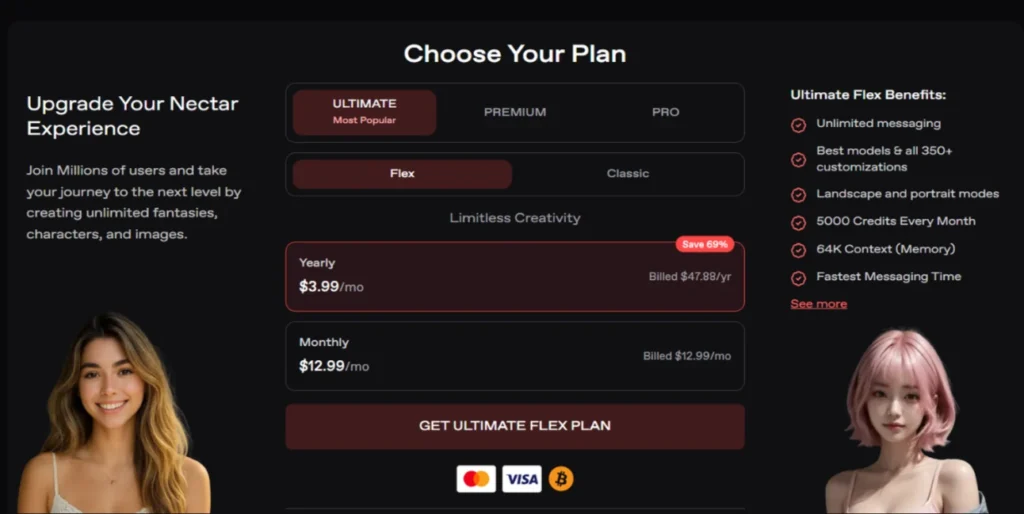
The companion video feature is gated. Not partially, completely. It lives exclusively on the Ultimate plan.
Here is how Nectar AI’s plan structure breaks down, with video access clearly marked:
| Plan | Monthly Price | Annual Price | Video Generation |
|---|---|---|---|
| Classic | Entry-level | — | ❌ No |
| Pro | — | — | ❌ No |
| Premium | $12.99/mo | — | ❌ No |
| Ultimate Flex | $12.99/mo | $3.99/mo (billed $47.88/yr) | ✅ Yes |
The annual Ultimate Flex plan at $3.99/month billed annually is currently shown as saving 69% compared to monthly pricing.
At $47.88 per year, this is the most cost-efficient access point for the video feature — and by a significant margin compared to the $12.99/month billing option.
Beyond the plan, the credit reality:
Each video costs 50 advanced credits. Credits are purchased separately from the subscription. The plan unlocks access to video generation, credits pay for each video you generate.
If you are on the Ultimate plan and want to generate videos regularly, budget your credit consumption accordingly. A session with 10 video generations costs 500 advanced credits on top of your subscription.
⚠️ Worth Knowing
If you were part of the Nectar AI video alpha group, your remaining credits from that program are still usable, but they no longer auto-refresh. Once they’re gone, they’re gone. Moving to the standard Ultimate credit system is the path forward after alpha credits are exhausted.
✅ Honest Quality Assessment: Above Average, Average, or Below
Here’s the rating breakdown based on everything researched, tested, and aggregated from independent user experience:
| Quality Dimension | Rating | Notes |
|---|---|---|
| Facial expression range | Above Average | Responds to emotional tone in prompt |
| Character identity consistency | Above Average | Companion features carry through reliably |
| Emotional tonal accuracy | Average | Broad tones work well, nuanced shifts are less reliable |
| Motion naturalness | Average | Better than avatar-based systems, below live-action realism |
| Anatomical accuracy in motion | Average | Standard AI limitations apply in complex poses |
| NSFW output quality | Average | Simpler compositions produce best results |
| Prompt adherence | Above Average | Tag system significantly improves precision |
| Background scene rendering | Average | Controlled indoor settings perform best |
| Generation speed | Above Average | Fast enough to maintain session flow |
| Customization depth | Best in Class for price tier | Tag layers, styles, poses, effects together |
The most accurate single-sentence description of the video feature’s current state: it performs above average on the dimensions that matter most for companion use cases, and sits at average on the dimensions it shares with all AI video generation systems globally.
🤔 How Nectar AI Video Compares to Other AI Companion Platforms
Video generation in the AI companion space is still relatively new. Very few platforms have it at all, which contextualizes Nectar’s position meaningfully.
| Platform | Video Feature | Quality | Gating |
|---|---|---|---|
| Nectar AI | ✅ Yes, generated companion video | Above average for category | Ultimate plan only |
| Candy AI | ✅ Yes, Live Action beta (120-second) | Strong, slightly more polished | Premium plan |
| Character.AI | ❌ No | — | — |
| Replika | ❌ No | — | — |
| CrushOn.AI | ⚠️ Limited | Basic | Higher tiers |
| DreamGF | ⚠️ Limited | Basic | Higher tiers |
Candy AI’s Live Action beta is the most direct competitor in this specific dimension. It produces longer clips (up to 120 seconds) with strong visual consistency.
Nectar’s advantage is the deeper companion model integration; the video output feels more character-specific because it is built on top of Nectar’s more detailed character definition system.
The honest competitive read: Candy AI currently edges Nectar on raw video quality and clip length. Nectar edges Candy AI on character customisation depth that feeds into the video output and the in-chat generation context system.
Which matters more depends entirely on what you’re using the feature for.
🤔 Who Gets the Most Value From the Video Feature?
Strong fit for:
Weaker fit for:
❓ Frequently Asked Questions About the Nectar AI Companion Video Feature
What is the Nectar AI companion video feature?
It is a credit-powered video generation system available on the Ultimate plan that creates short animated clips of your custom AI companion. It operates in both a standalone Image Generator + Video mode and as an in-chat generation option during active roleplay sessions.
How much does each video cost on Nectar AI?
Each video costs 50 advanced credits. Credits are purchased separately from the subscription plan. The subscription unlocks access; credits pay for each individual generation.
What plan do I need for the Nectar AI video feature?
The video feature is exclusive to the Ultimate plan. It is not available on Classic, Pro, or Premium plans. The annual Ultimate Flex plan is priced at $3.99/month billed as $47.88 per year.
Is facial animation in Nectar AI videos realistic?
It is above average for the AI companion video category. Expressions respond to emotional tone, character identity is visually consistent, and movement feels more natural than avatar-based animation systems. It is not photorealistic video in the cinematic sense.
Can I generate NSFW animated companion videos on Nectar AI?
Yes, with NSFW mode enabled. Explicit body and outfit parameters are available in the tag system and carry into video output. Simpler compositions produce more reliable results for adult content.
How does in-chat video generation differ from standalone video generation?
In-chat generation pulls context from your active conversation and produces a video that responds to the current emotional and narrative tone of your session. Standalone generation gives you full manual control over all visual parameters via the Image Generator + Video interface.
How long are the videos generated by Nectar AI?
Nectar AI generates short clips rather than extended video scenes. The feature is designed for immersive companion interactions, not long-form content production.
Does the Nectar AI video feature work for anime-style companions?
Yes. The customization system and model architecture support both realistic and anime aesthetic directions in video output, consistent with Nectar’s multi-model image generation approach.

AIPornGuru Recommends
🎯 Verdict: Is the Nectar AI Companion Video Feature Worth It in 2026
Here’s the straight answer.
Yes, if you’re already on the Ultimate plan, or planning to be.
The companion video feature is not a gimmick feature added to justify a higher price tier. It is a genuinely functional, above-average-for-the-category capability that meaningfully extends what Nectar AI can do as an immersive companion platform.
The facial animation has real emotional responsiveness. The in-chat generation preserves immersion in a way that separate tool navigation cannot. The customisation depth, outfits, poses, faces, scenes, styles, and effects are more granular than any directly competing companion video tool at this price point.
At $3.99/month billed annually, the Ultimate Flex plan is priced well below what the feature set would cost on comparable platforms. That is the right access point.
The honest qualifier: if you are coming to Nectar AI exclusively for video generation and have no interest in the chat, image, and roleplay ecosystem around it, a dedicated AI video generation tool may produce technically superior output. But if you are here for the full companion experience, chat, images, roleplay, and now video woven together, the video feature adds a layer that none of the lower-tier plans can replicate.
It turns a companion you read into a companion you watch. That’s not a small thing.

Mike Smith, a tech journalist, uncovers the freshest trends in AI porn. With sharp insight, he chronicles how innovations shape adult content’s future, delivering must-read stories for fans of NSFW tech and its evolving role in our world.
Affiliate Disclosure: This post may contain some affiliate links, which means we may receive a commission if you purchase something that we recommend at no additional cost for you (none whatsoever!)